Profile a neighbourhood with Overture places data
Site selection, property listings and local-insight dashboards all ask the same first question: what is actually around this point? Lots of offices, or lots of bars? Hotels, clinics, schools? With the raw Overture release you'd download the places GeoParquet and group by category in DuckDB. With the Overture Maps API it's one request for the detailed mix and a handful more for the big picture.
This guide profiles two very different parts of London: Soho and Canary Wharf. London is one of the demo key's cities, so every request below works as written with DEMO-API-KEY. Swap in your own coordinates and your own key when you're ready to go anywhere else.
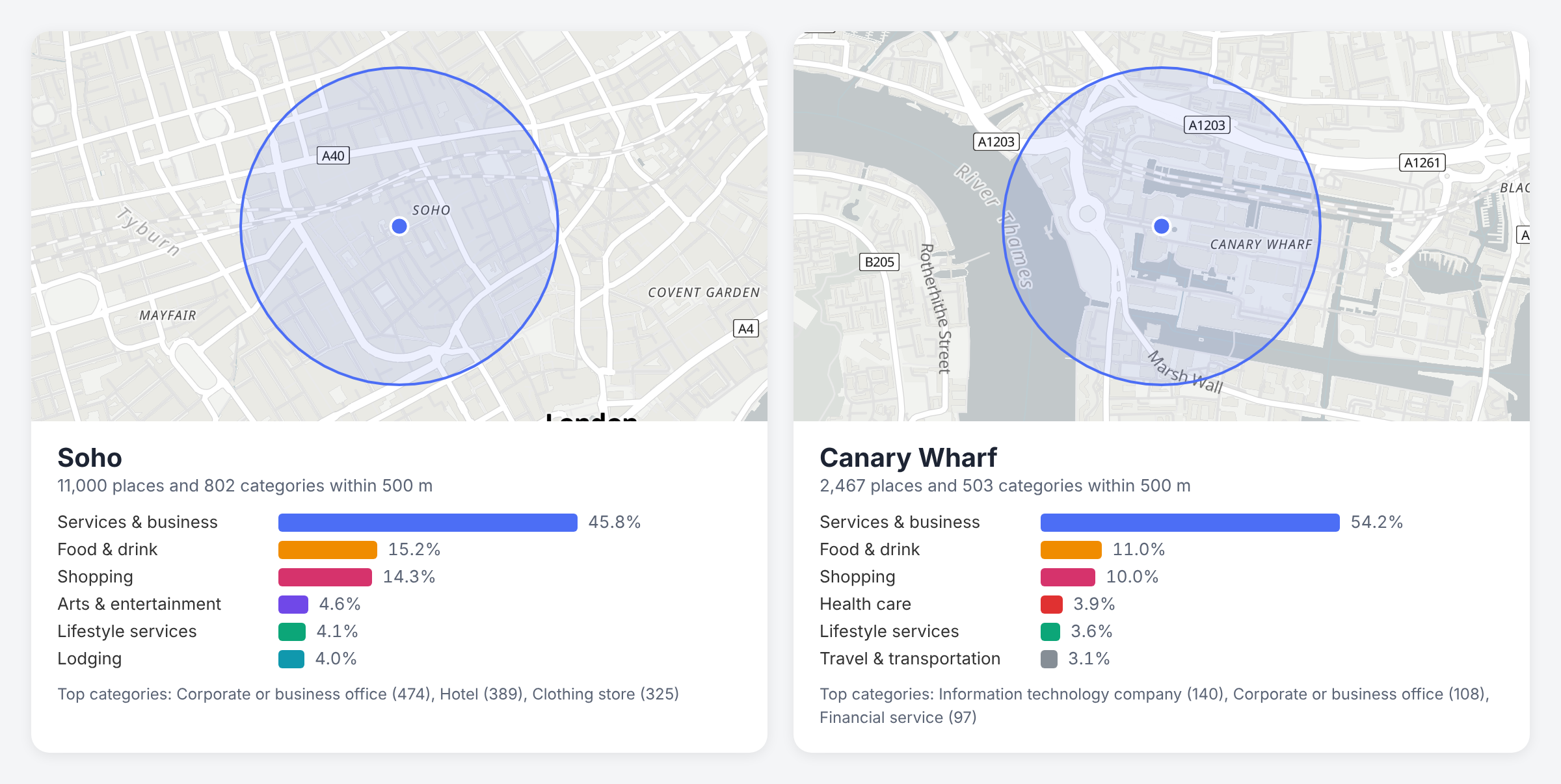
/places/categories and /places responses within 500 m. Map: OpenFreeMap, © OpenMapTiles, data © OpenStreetMap contributors.
What you'll build
A profile for any point that shows:
- every place category within a radius, with a count for each, busiest first
- the share of places in each of Overture's 13 top-level groups (food and drink, shopping, lodging and so on)
- a side-by-side comparison of two areas
- the actual places behind any category, when you want to drill in
Step 1: Count categories inside a radius
/places/categories is usually shown with country, but it also takes lat, lng and radius. It returns one row per category with the number of places and the number of brands in it, sorted by place count:
curl -H "x-api-key: DEMO-API-KEY" -X GET -G 'https://api.overturemapsapi.com/places/categories' \
-d 'lat=51.5136' -d 'lng=-0.1365' -d 'radius=500'
[
  { "primary": "corporate_or_business_office", "counts": { "places": 474, "brands": 0 } },
  { "primary": "hotel", "counts": { "places": 389, "brands": 4 } },
  { "primary": "clothing_store", "counts": { "places": 325, "brands": 57 } },
  { "primary": "professional_service", "counts": { "places": 284, "brands": 6 } },
  { "primary": "information_technology_company", "counts": { "places": 282, "brands": 0 } }
]
Within 500 m of central Soho that's 802 categories in a single response. The whole list comes back at once: limit and other /places filters such as taxonomy have no effect on this endpoint, so filter and slice on your side.
Run the same request for Canary Wharf (lat=51.5054, lng=-0.0235) and you get 503 categories, led by information_technology_company (140), corporate_or_business_office (108) and financial_service (97). Two lines of output already tell you these are different places.
Step 2: Fetch a profile in TypeScript
type CategoryCount = {
  primary: string;
  counts: { places: number; brands: number };
};

const API = "https://api.overturemapsapi.com";
const HEADERS = { "x-api-key": "YOUR-API-KEY" };

export async function categoryMix(
  lat: number,
  lng: number,
  radius = 500,
): Promise<CategoryCount[]> {
  const params = new URLSearchParams({
    lat: String(lat),
    lng: String(lng),
    radius: String(radius),
  });
  const res = await fetch(`${API}/places/categories?${params}`, { headers: HEADERS });
  if (!res.ok) throw new Error(`Categories request failed: ${res.status}`);
  return (await res.json()) as CategoryCount[];
}

const soho = await categoryMix(51.5136, -0.1365);
console.log(soho.slice(0, 10)); // the ten busiest categories
The brands count is a useful second signal. In Soho, clothing_store has 57 brands among 325 places, so it's chain-heavy, while corporate_or_business_office has 474 places and no brands at all.
Step 3: Roll up into the 13 top-level groups
Hundreds of fine-grained categories are great for detail and hard to compare. Overture's taxonomy puts every category under one of 13 top-level groups:
services_and_business, shopping, food_and_drink, health_care, lifestyle_services, travel_and_transportation, education, cultural_and_historic, sports_and_recreation, lodging, community_and_government, arts_and_entertainment, geographic_entities
The taxonomy filter on /places matches a place's category or any ancestor, so taxonomy=food_and_drink covers every restaurant, café, bar and bakery. You don't need the places themselves, only how many there are, and that comes back in the Pagination-Count response header. So ask for one result per group and read the header:
curl -s -D - -o /dev/null -H "x-api-key: DEMO-API-KEY" -G 'https://api.overturemapsapi.com/places' \
-d 'lat=51.5136' -d 'lng=-0.1365' -d 'radius=500' -d 'taxonomy=food_and_drink' -d 'limit=1' \
| grep -i pagination-count
pagination-count: 1670
Do that for all 13 groups, plus once with no filter for the total, and divide:
const GROUPS = [
  "services_and_business", "shopping", "food_and_drink", "health_care",
  "lifestyle_services", "travel_and_transportation", "education",
  "cultural_and_historic", "sports_and_recreation", "lodging",
  "community_and_government", "arts_and_entertainment", "geographic_entities",
] as const;

type Group = (typeof GROUPS)[number];

async function countPlaces(lat: number, lng: number, radius: number, taxonomy?: Group): Promise<number> {
  const params = new URLSearchParams({
    lat: String(lat),
    lng: String(lng),
    radius: String(radius),
    limit: "1",
  });
  if (taxonomy) params.set("taxonomy", taxonomy);
  const res = await fetch(`${API}/places?${params}`, { headers: HEADERS });
  if (!res.ok) throw new Error(`Places request failed: ${res.status}`);
  return Number(res.headers.get("Pagination-Count") ?? 0);
}

export async function groupShares(lat: number, lng: number, radius = 500) {
  const [total, ...counts] = await Promise.all([
    countPlaces(lat, lng, radius),
    ...GROUPS.map((g) => countPlaces(lat, lng, radius, g)),
  ]);
  return {
    total,
    groups: GROUPS.map((group, i) => ({
      group,
      places: counts[i],
      share: Math.round((counts[i] / total) * 1000) / 10, // one decimal place
    })).sort((a, b) => b.places - a.places),
  };
}
That's 14 small requests per profile, well inside the demo key's 60 requests a minute. Pagination-Count is exposed to browsers through CORS, so this works client-side as well as on a server. The group counts add up to slightly less than the total, because a few places carry no taxonomy.
Step 4: Compare two neighbourhoods
Here are the results for both areas at 500 m:
| Group | Soho | Canary Wharf |
|---|---|---|
| All places | 11,000 | 2,467 |
| Services & business | 5,037 (45.8%) | 1,338 (54.2%) |
| Food & drink | 1,670 (15.2%) | 271 (11.0%) |
| Shopping | 1,575 (14.3%) | 247 (10.0%) |
| Arts & entertainment | 506 (4.6%) | 30 (1.2%) |
| Lodging | 441 (4.0%) | 21 (0.9%) |
| Health care | 209 (1.9%) | 95 (3.9%) |
Compare shares, not raw counts. Soho has four times as many places in the same radius, so it "wins" every row on counts alone. As shares, the story is clearer: Canary Wharf leans harder on business services and has proportionally more health care, while Soho's mix tilts towards food, shopping, entertainment and hotels.
const [a, b] = await Promise.all([
  groupShares(51.5136, -0.1365), // Soho
  groupShares(51.5054, -0.0235), // Canary Wharf
]);

for (const g of a.groups) {
  const other = b.groups.find((x) => x.group === g.group)!;
  console.log(`${g.group.padEnd(28)} ${String(g.share).padStart(5)}%  ${String(other.share).padStart(5)}%`);
}
Keep the radius the same when you compare, and keep it walkable. 500 m is a good default for a dense city centre; suburbs usually need 1,000 m or more to say anything useful. The demo key caps the radius at 2,000 m.
Step 5: Drill into one category
When a number stands out, list the places behind it. Pass the category from Step 1 to the categories filter on /places:
curl -H "x-api-key: DEMO-API-KEY" -X GET -G 'https://api.overturemapsapi.com/places' \
-d 'lat=51.5136' -d 'lng=-0.1365' -d 'radius=500' -d 'categories=cocktail_bar' -d 'limit=5'
Results come back nearest first. Around central Soho the first three are Milk & Honey, Anam Bar and The Blind Pig, each with its name, coordinates, address, contact details and operating_status.
The two endpoints can disagree by a few places. /places/categories counts 110 cocktail bars in this radius, while the /places search above reports a Pagination-Count of 107. Treat a profile as a picture of the area, not an exact audit, and use /places when you need the precise list.
Going further
- Show the places on a map. Add
format=geojsonto the drill-down request and hand it to MapLibre or Leaflet. Map every location of a retail chain shows the Leaflet version. - Build a feed from the same filters. The
taxonomyandcategoriesvalues you profiled are the same ones that power category chips in Build a "what's near me" feature. - Profile whole countries.
/places/categories?country=GBreturns the national mix, which makes a handy baseline for "is this area unusual?". See GET /places/categories. - More results. Page through any
/placeslist withlimitandpage. See Pagination. - What the data is. What is Overture Maps? covers the themes, licences and release cadence.
That's the whole profile: one /places/categories call for the detail, one header read per taxonomy group for the big picture, and shares rather than raw counts when you compare.