Type-Ahead Place Search with name_prefix

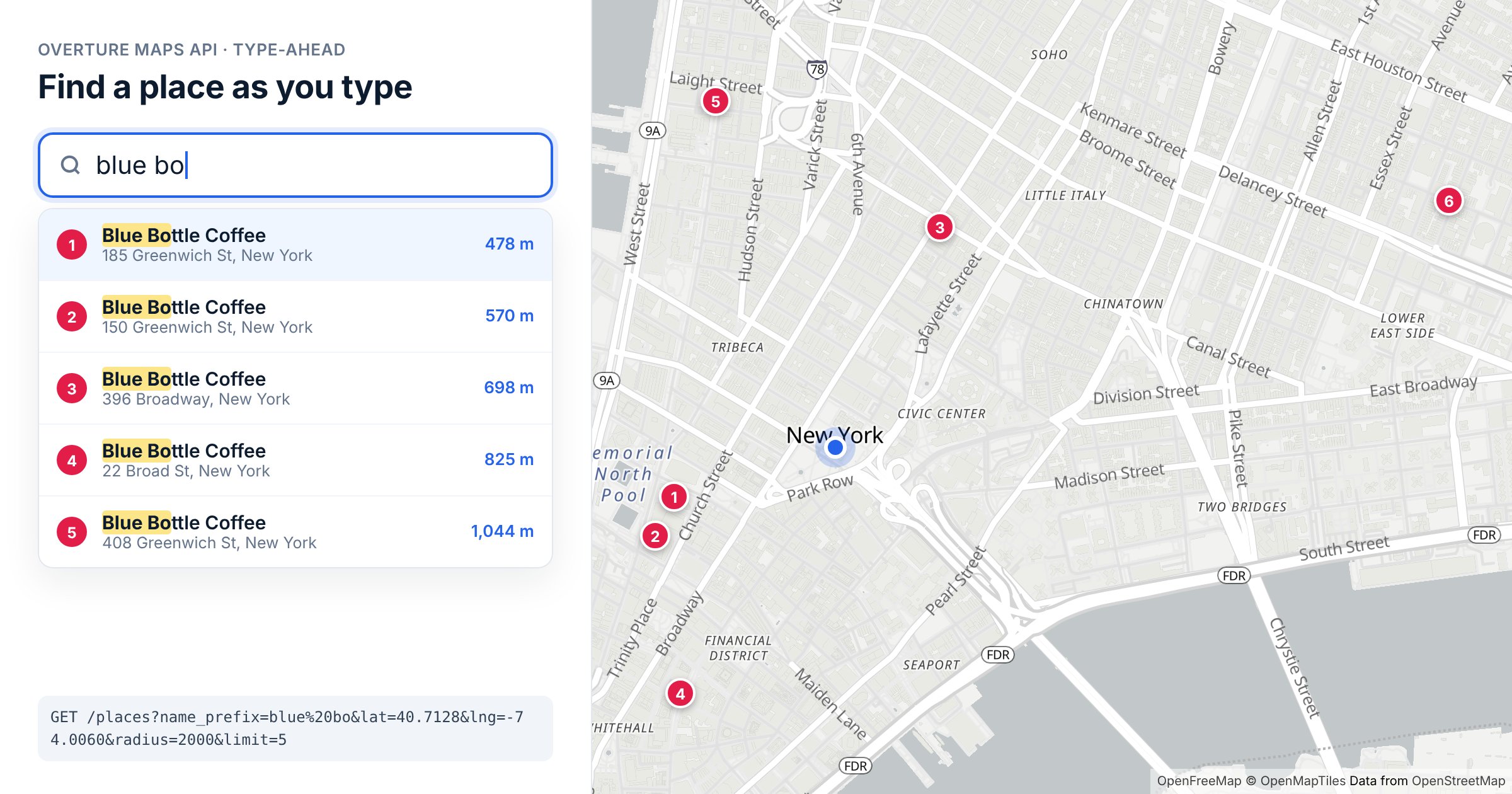
You can now search Overture places by the first few letters of their name. Type "blue bo" near Lower Manhattan and the API returns the Blue Bottle Coffee shops around you, nearest first. That's the building block for the location field every app needs: a box that suggests places as someone types.
How it works
Add name_prefix to a /places search:
curl -i -H "x-api-key: DEMO-API-KEY" -X GET -G 'https://api.overturemapsapi.com/places' \
-d 'lat=40.7128' -d 'lng=-74.0060' -d 'radius=2000' \
--data-urlencode 'name_prefix=blue bo' -d 'limit=5'
Pagination-Count: 6
Six places within 2 km match, and the five you asked for come back nearest first:
| Place | Address | Distance | |
|---|---|---|---|
| 1 | Blue Bottle Coffee | 185 Greenwich St | 478 m |
| 2 | Blue Bottle Coffee | 150 Greenwich St | 570 m |
| 3 | Blue Bottle Coffee | 396 Broadway | 698 m |
| 4 | Blue Bottle Coffee | 22 Broad St | 825 m |
| 5 | Blue Bottle Coffee | 408 Greenwich St | 1,044 m |
The rules are simple:
- It matches the start of the name, or the start of any word in it. "blue bo" and "bottle" both find Blue Bottle Coffee. "bottle" returns the same six places.
- It's case-insensitive, and needs at least two characters. A single letter returns a
400saying so. - With
latandlng, results come back nearest first, so a smalllimitgives you the closest few. That's exactly what a suggestions list wants.
It works alongside the other /places filters. Add categories=coffee_shop and you get only the five Blue Bottles filed as coffee shops; the one at 185 Greenwich St is filed as a cafe, so it drops out. A broader prefix casts a wider net: "blue" alone matches 136 places within the same 2 km, from Blue Spoon Coffee Co. to firms whose names start with "Blueprint".
Building a search box
Each request is a real search, so don't fire one on every keystroke. Wait until the person pauses, start at two or three characters, and cancel any request that's been overtaken by newer typing:
type Suggestion = { id: string; name: string; address?: string; lat: number; lng: number };

const API = "https://api.overturemapsapi.com/places";
let inFlight: AbortController | null = null;

async function suggest(text: string, lat: number, lng: number): Promise<Suggestion[]> {
  if (text.trim().length < 2) return [];

  inFlight?.abort(); // newer typing wins
  inFlight = new AbortController();

  const params = new URLSearchParams({
    name_prefix: text.trim(),
    lat: lat.toFixed(3), // ~100 m: nearby users share cached results
    lng: lng.toFixed(3),
    radius: "2000",
    limit: "5",
  });
  const res = await fetch(`${API}?${params}`, {
    headers: { "x-api-key": "YOUR-API-KEY" },
    signal: inFlight.signal,
  });
  if (!res.ok) return [];

  const places: any[] = await res.json();
  return places.map(({ geometry, properties: p }) => ({
    id: p.id,
    name: p.names.primary,
    address: p.addresses?.[0]?.freeform,
    lat: geometry.coordinates[1],
    lng: geometry.coordinates[0],
  }));
}

// Debounce: search 300 ms after the last keystroke
let timer: ReturnType<typeof setTimeout> | undefined;
input.addEventListener("input", () => {
  clearTimeout(timer);
  timer = setTimeout(async () => {
    try {
      render(await suggest(input.value, userLat, userLng));
    } catch (e) {
      if ((e as Error).name !== "AbortError") throw e;
    }
  }, 300);
});
The id is the place's GERS ID, Overture's stable identifier, so it's the right thing to store once someone picks a suggestion.
What to expect on speed
In our tests, a fresh "blue bo" search took about 1.2 seconds, and repeating it took about 0.15 seconds, because identical searches are served from the cache. That suits a debounced field like the one above, where suggestions appear a moment after someone stops typing. It isn't instant per-keystroke autocomplete. Rounding coordinates, as in the example, means people searching near each other hit the same cache.
On your monthly allowance, each search that reaches the API counts as one request, so debouncing and a two-character minimum also keep your usage down. See Usage limits.
Try it
DEMO-API-KEY works near New York, London, Paris and Sydney, so the example above runs as it is. For anywhere else, get a free API key. The full parameter reference is in the /places docs, and if you're building a nearby list rather than a search box, see Build a "what's near me" feature.